
Supervisor1.9 - Get APK
You'll be able to download in few seconds.
Publisher Description
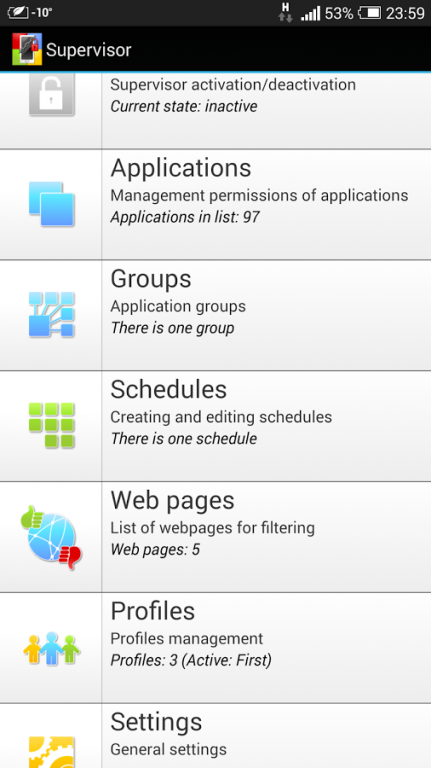
You can use this software to prevent access to specific applications and features of your device. It can also restricts web-browsing i.e. helps you to set limits on the websites your children can visit.
You will be able to receive:
- information about web requests and location of device;
- report of applications usage.
Take complete control of your phone - find out where was device at specific time and which application has been launched.
Parental control - you can install the software on your child's phone and restrict access on games during school time or any other time. After installing the software you will be able to give your phone/tablet to your child with no worries that he/she downloads something, buys anything in internet-shop or changes your device settings. You can hide your contacts, SMS or Instant messenger history and leave your phone unattended.
Limiting applications usage - Supervisor allows to block apps according to:
- weekly schedule accurate within minutes;
- daily timer;
- unconditional ban;
- combination of timer and schedules.
Web-filter allow you to control access to websites.
In addition the program has following options:
- new software purchasing prohibition;
- phone calls and/or SMS sending prohibition;
- restriction of system settings changing.
Also you get remotely reports about usage device on program site:
- device location;
- applications usage information;
- list of internet-requests.
About Supervisor
The company that develops Supervisor is sid. The latest version released by its developer is 1.9.
To install Supervisor on your Android device, just click the green Continue To App button above to start the installation process. The app is listed on our website since 2016-01-12 and was downloaded 0 times. We have already checked if the download link is safe, however for your own protection we recommend that you scan the downloaded app with your antivirus. Your antivirus may detect the Supervisor as malware as malware if the download link to ru.sid.supervisor is broken.
How to install Supervisor on your Android device:
- Click on the Continue To App button on our website. This will redirect you to Google Play.
- Once the Supervisor is shown in the Google Play listing of your Android device, you can start its download and installation. Tap on the Install button located below the search bar and to the right of the app icon.
- A pop-up window with the permissions required by Supervisor will be shown. Click on Accept to continue the process.
- Supervisor will be downloaded onto your device, displaying a progress. Once the download completes, the installation will start and you'll get a notification after the installation is finished.
Program Details
System requirements
Download information
Pricing
Version History
version 1.9
posted on 2016-01-12
version 1.3.4
posted on 2013-06-17
Several fixes and updates
Disclaimer
External Download
We do not host Supervisor on our servers. We did not scan it for viruses, adware, spyware or other type of malware. This app is hosted by Galad and passed their terms and conditions to be listed there. We recommend caution when installing it.
The APK Download link for Supervisor is provided to you by apps112.com without any warranties, representations or guarantees of any kind, so access it at your own risk.
If you have questions regarding this particular app contact the publisher directly. For questions about the functionalities of apps112.com contact us.
